


ESP32-C5-WROOM-1 Breakout 시험 PCB (2)


펌웨어 라이팅을 위한 하드웨어 연결 방법
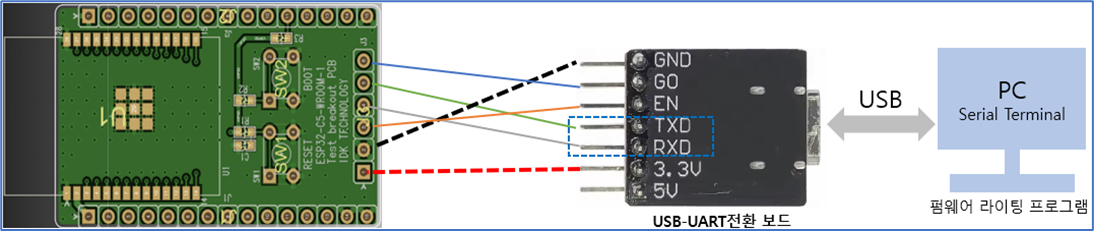
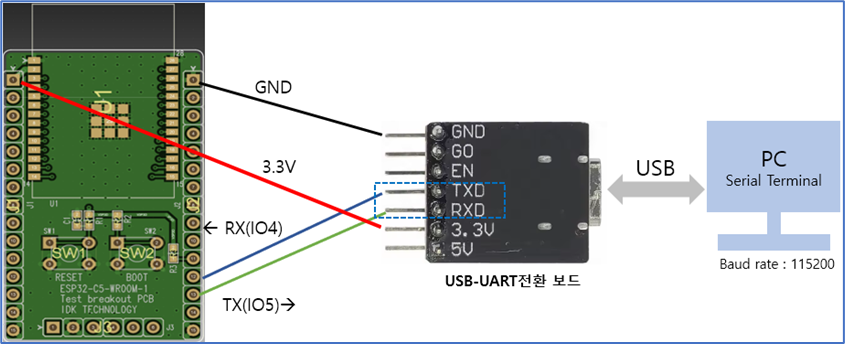
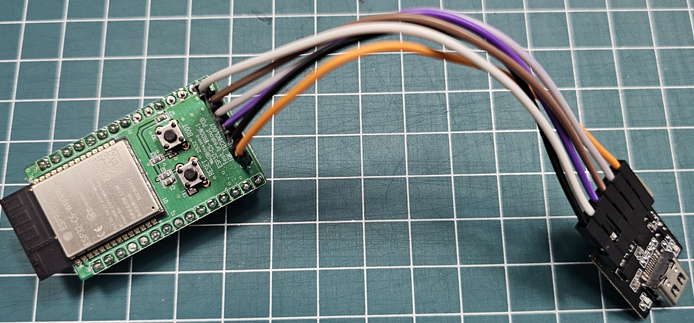
USB-UART 전환 보드에 따라서 아래와 같이 펌웨어 라이팅 방법이 달라집니다. (자동형, 수동형)
| USB-UART전환 보드 (자동다운로드 형) |
펌웨어 라이팅 프로그램 실행 후 라이팅 Start |
| USB-UART전환 보드 일반 (자동 다운로드 회로가 없는 형) |
1) SW2 누른 상태에서 SW1으로 모듈 리셋하여 수동으로 펌웨어 라이팅모드 진입 2) 펌웨어 라이팅 프로그램에서 라이팅 Start |
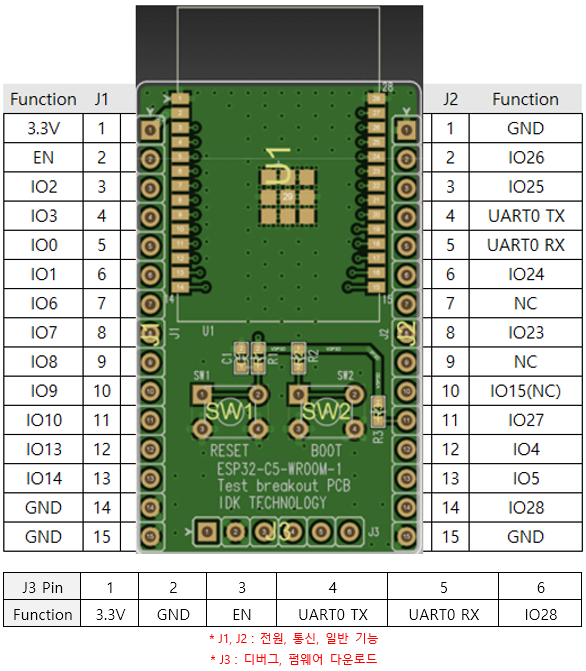
Pin map
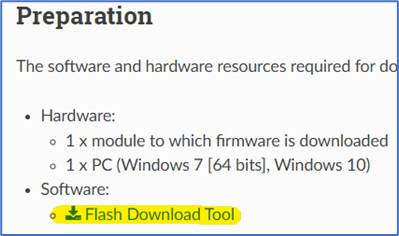
펌웨어 라이팅 프로그램 다운로드 / 매뉴얼
Flash Download Tool User Guide - ESP32 - — ESP Test Tools latest documentation
Below are the configuration options. The equal sign is followed by the default value of the option. True means enabling the option; False means disabling it. There will be a prompt message (shown below) when the tool is running. Check if the message is cor
docs.espressif.com
펌웨어 Bin파일 얻기 : 시험용 AT command 펌웨어 요청 링크
*시험용 AT펌웨어의 상용 제품 적용에 대한 결정은 고객사의 책임하에 결정됩니다.
*시험용 AT펌웨어 다운로드 (bin파일) : 아래 링크를 통하여 요청하시면 됩니다.
https://idktech.co.kr/?page_id=666&lang=ko
시험용 AT 펌웨어 다운로드
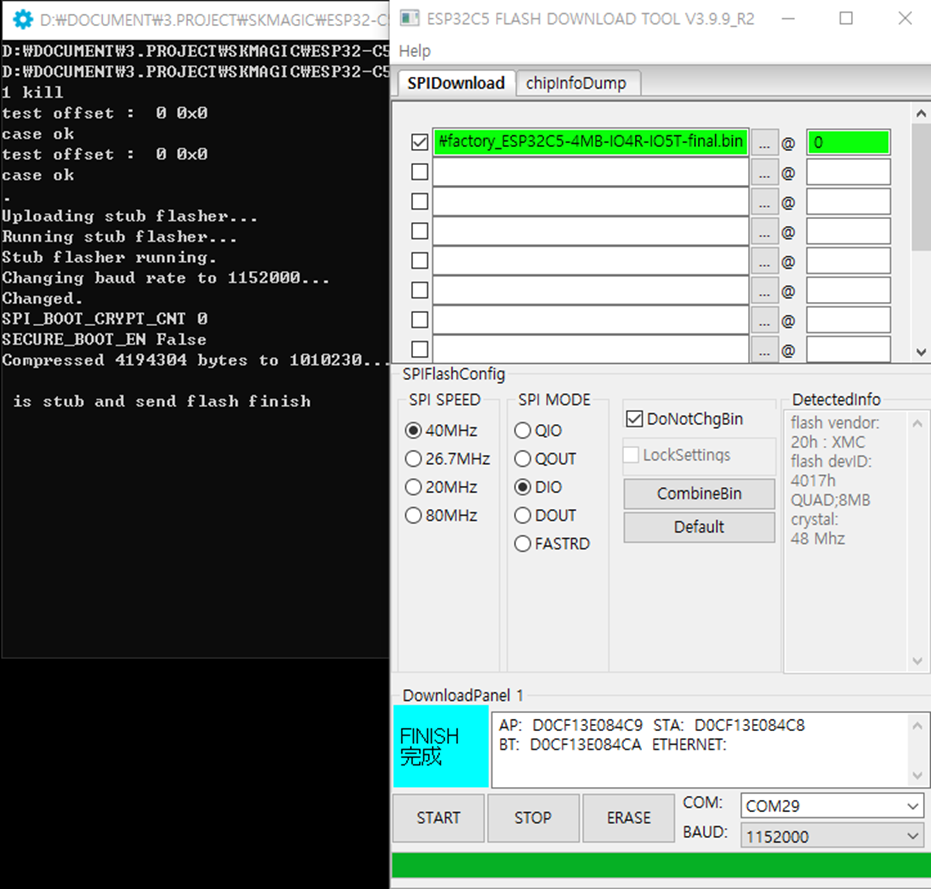
- 펌웨어 다운로드 프로그램(Flash Download Tool) 실행 >> ESP32-C5 선택 >> UART 선택
- Offset 0x0
- DoNotChange선택 (펌웨어 변경없이 그대로 라이팅)
- Baudrate 선택
- COM port선택
- START 클릭
AT command 시험
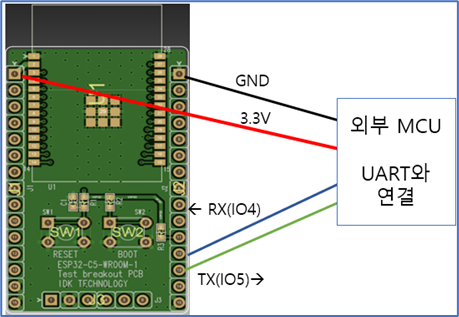
펌웨어 라이팅 완료 후 AT command통신은 IO4, IO5를 통하여 통신이 됩니다.
| ESP32-C5 Pin | PC (MCU) | 비고 |
| Power 3.3V | 3.3V power | 최대 전압 3.6V 이내, 전류 500mA이상 |
| Ground | Ground | |
| UART1 RX (IO4) | UART TX | |
| UART1 TX (IO5) | UART RX |
AT command 명령어 통신을 위한 연결
AT command 명령 메뉴얼
AT command 명령은 아래 메뉴얼 참고 바랍니다.
https://docs.espressif.com/projects/esp-at/en/latest/esp32/AT_Command_Set/
AT Command Set - ESP32 - — ESP-AT User Guide latest documentation
+IPD ESP-AT received the data from the network when AT is not in Passthrough Mode. The message formats are as follows: +IPD, will be outputted if AT+CIPMUX=0 and AT+CIPRECVTYPE=1. +IPD, , will be outputted if AT+CIPMUX=1 and AT+CIPRECVTYPE= ,1. +IPD, : wil
docs.espressif.com
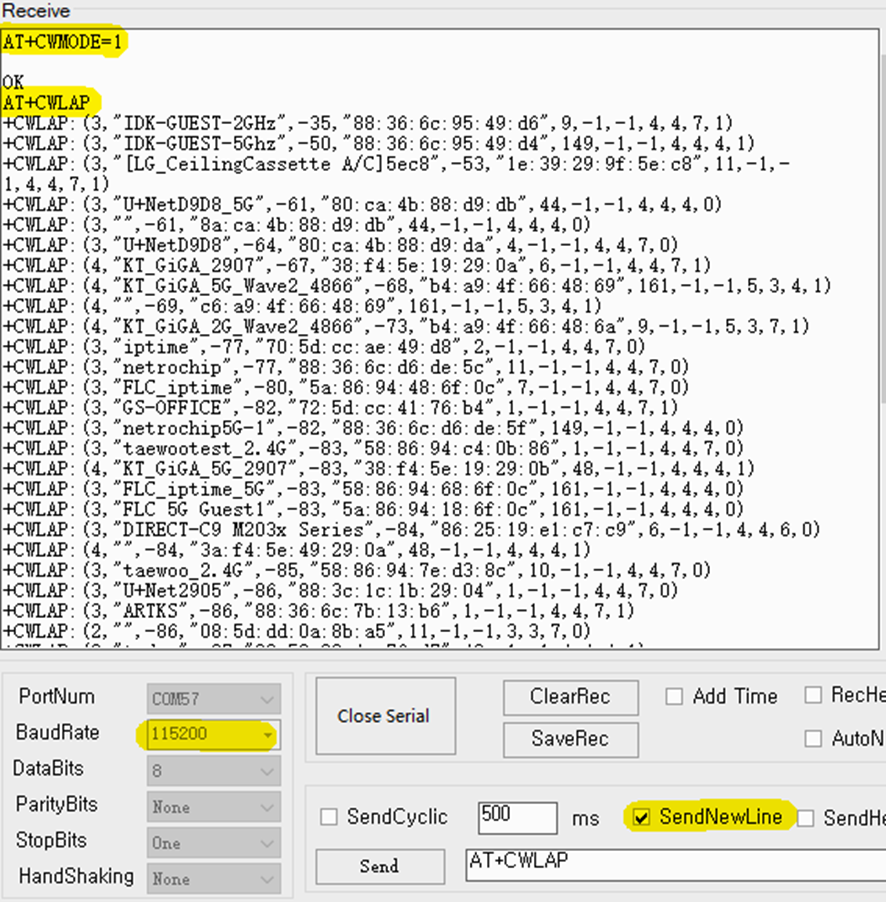
예 : WiFi Scan
AT+CWMODE=1
AT+CWLAP
㈜아이디케이 테크놀러지
ESPRESSIF 한국 공식 대리점
Blog : devicein.tistory.com
'ESPRESSIF' 카테고리의 다른 글
| [ESP32] 펌웨어(Firmware) 라이팅 - 하드웨어 기본 연결 (0) | 2025.09.05 |
|---|---|
| ESP32-C5-WROOM-1 Breakout 시험 PCB (1) (0) | 2025.08.13 |
| ESP32-P4 revision 관련 사항 (0) | 2025.08.07 |
| ESPRESSIF 제품 기술 자료 다운로드 방법 (0) | 2025.08.06 |
| ESP32-H2 Errarta 및 리비젼에 따른 IDF 버전 주의 사항 (0) | 2025.07.31 |

